Professionelle Drum-Notation für iPhone, iPad & Mac
Textbasierte Schlagzeug-Notation mit MIDI-Wiedergabe, Custom Font und Live-BPM-Erkennung
Hauptfeatures
iPhone Feature-Parität
Alle 18 Drum-Symbole auf iPhone verfügbar. Scrollbare Palette mit organisierten Abschnitten. Landscape-Modus mit horizontalem Scrollen. Keine Feature-Einschränkungen.
Quick BPM Setting
Neuer Set-BPM-Button für sofortige Tempo-Konfiguration. Pre-fill mit aktuellem BPM. Automatische Section-Header-Erstellung. Funktioniert auf allen Plattformen.
Swing & Shuffle (NEU v1.11)
Authentischer Jazz/Blues-Feel mit Standard-Swing-Notation. "Shuffle" für 67% Swing oder präzise Werte (50-75%). UI-Button mit 5 Presets. Nur 8tel-Noten (standard-konform).
Taktart-Picker (NEU v1.12)
UI-Button für schnellen Taktart-Wechsel. Presets für 4/4 (Standard), 3/4 (Walzer), 6/8 (Jig). Automatische Metadata-Aktualisierung. Perfekt für Walzer, Jigs und verschiedene Musikstile.
Custom DrumCharter Font
Professionelle Monospace-Schriftart mit 42 speziell designten Glyphen für Concert Mode. Perfekte Lesbarkeit aus der Distanz.
Concert Mode Font Controls
Schriftgröße direkt in Concert Mode anpassbar (10-40pt). Cmd+/Cmd- Shortcuts auf macOS. Perfekt für Stage-Lighting und Distanz-Anpassung.
Practice Mode mit Live-BPM
Echtzeit-Tempo-Erkennung von MIDI/E-Drums. Visuelles Metronom und Trend-Anzeige für perfektes Timing.
Triplet-Support
8tel-Triolen mit ³-Symbol für Swing und fortgeschrittene Rhythmen. 48tel-Präzisionsgrid.
Concert Mode für iPhone
Optimiert für alle Geräte. iPhone: 2-4 Takte pro Zeile. iPad/Mac: 4-6 Takte. Automatische Anpassung an Bildschirmgröße.
Kombinations-Symbole
p, d, g für Snare+Tom-Hits. Perfekt für komplexe Fills und Ghost-Note-Patterns.
Beispiel-Notation
Concert Mode in Aktion
So sieht Drum Charter im Concert Mode aus - mit Custom Font, großer Darstellung und professioneller Lesbarkeit
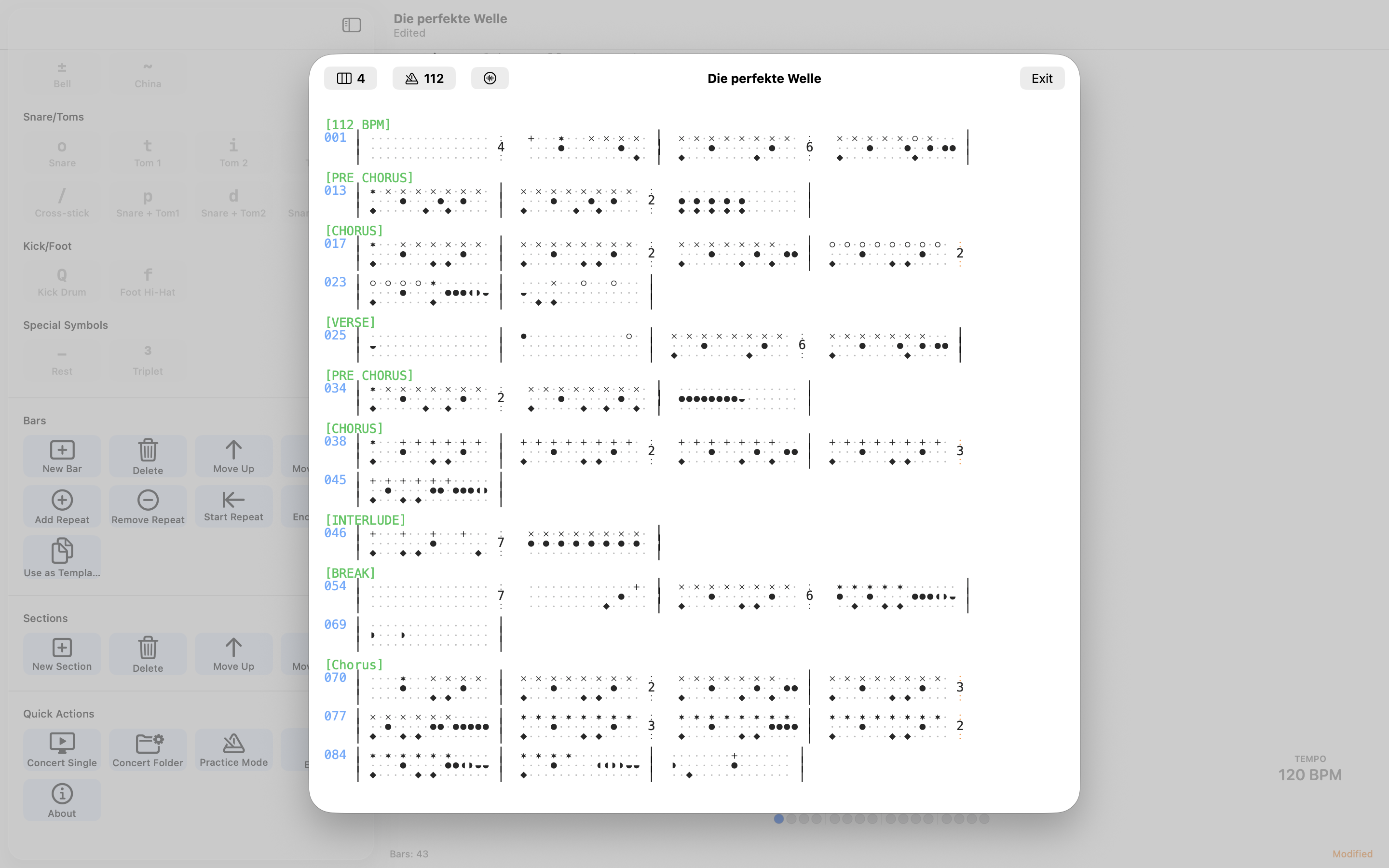
Notation-Symbole
Cymbals (Zeile 1)
x= Hi-Hat*= Crash°= Open Hi-Hat+= Ride±= Bell
Snare/Toms (Zeile 2)
o= Snaret= Tom 1i= Tom 2j= Floor Tomp, d, g= Snare+Tom Kombos/= Cross-stick
Kick/Pedal (Zeile 3)
Q= Kick Drumf= Foot Hi-Hat-= Pause/Rest³= Triplet-Marker
Tastatur-Shortcuts
| Shortcut | Funktion |
|---|---|
| Cmd+B | Takt einfügen |
| Cmd+Shift+S | Section einfügen |
| Cmd+Shift+C | Concert Mode |
| Cmd+Option+F | Notation formatieren |
| Cmd+Option+V | Validieren |
| Leertaste | Play/Pause |
| Escape | Stop |
| Tab | Takt mit Pausen vervollständigen |
| Cmd++ | Concert Mode Schriftgröße erhöhen |
| Cmd+- | Concert Mode Schriftgröße verkleinern |
Häufig gestellte Fragen
Du kannst Symbole auf drei Arten einfügen:
- Klicke auf ein Symbol in der Palette links
- Tippe das Symbol direkt über die Tastatur
- Nutze Tastatur-Shortcuts (Mac/iPad)
Die Palette zeigt nur Symbole, die für deine aktuelle Cursor-Position gültig sind.
Triolen werden mit dem ³-Symbol markiert:
- Platziere ³ VOR dem ersten Triplet-Symbol
- Folge mit zwei weiteren Symbolen (z.B.
x³xx) - Triolen teilen 16tel-Noten in drei gleiche Teile
- Funktioniert auf allen Drum-Linien
Das Tempo kannst du auf zwei Arten einstellen:
- Nutze den Tempo-Slider in den Playback-Controls (60-240 BPM)
- Füge Metadata hinzu:
bpm: 120am Anfang der Datei
Ja! Drum Charter nutzt die dokument-basierte Architektur von iOS/macOS:
- Speichere Dateien in iCloud Drive
- Automatische Synchronisation zwischen Geräten
- Zugriff auf allen deinen Apple-Geräten
Drum Charter bietet mehrere Export-Optionen:
- Textbasiertes .drumchart Format (Standard)
- Multi-Column-Export für Drucken (2 oder 4 Takte/Zeile)
- Teilen über das Standard-Share-Sheet
- Export aus Concert Mode mit Custom Font
Überprüfe folgende Punkte:
- Ist dein Gerät stumm geschaltet? (iPhone: Silent-Switch)
- Ist die Lautstärke aufgedreht?
- Bei Bluetooth-Kopfhörern: Sind sie verbunden?
- Starte die App neu
Drum Charter nutzt AVAudioEngine mit MIDI-Samples. Audio wird beim ersten Play geladen.
Practice Mode bietet professionelle Übungs-Features:
- Verbinde dein MIDI/E-Drum-Set
- Live-BPM-Erkennung in Echtzeit
- Setze Target-BPM (60-240)
- Trend-Anzeige zeigt ob du zu schnell/langsam spielst (grün/gelb/rot)
- Visuelles Metronom für perfektes Timing
Concert Mode ist optimiert für Live-Performance:
- Vollbild-Ansicht mit 22pt Custom Font
- Optimal lesbar aus der Distanz
- Playlist-Support für ganze Song-Ordner
- Navigation mit Pfeil-Tasten
- Visuelles Metronom mit Live-BPM
- Adaptive Light/Dark Mode
- Schriftgröße anpassbar mit Cmd+/Cmd- (10-40pt)
Aktiviere Concert Mode mit Cmd+Shift+C
Version 1.12 bringt Multi-Taktart-Unterstützung mit UI-Picker:
- Taktart-Picker UI: Schnellzugriff-Button in Symbol-Palette für sofortige Taktart-Änderungen
- 3 Taktarten: 4/4 (Standard/Rock/Pop), 3/4 (Walzer), 6/8 (Jig/Compound Time)
- Automatische Metadata: Aktualisiert Song-Metadata automatisch (z.B. [3/4 - 120 BPM - Swing 67])
- Intelligente Formatierung: Entfernt alte Taktart sauber, verhindert Trailing-Dashes
- Variable Taktlängen: 16 Sechzehntel (4/4), 12 Sechzehntel (3/4 und 6/8)
- Audio-Engine-Anpassung: Playback passt sich automatisch an Taktart an
- Plattformübergreifend: Funktioniert auf iPhone, iPad und macOS identisch
- Vollständig kompatibel: Alle existierenden .drumchart-Dateien funktionieren weiterhin
Version 1.11 bringt professionellen Swing/Shuffle-Support:
- Swing & Shuffle: Authentischer Jazz/Blues-Feel für 8tel-Noten nach Standard-Notation
- Einfache Bedienung: "Shuffle" im Metadata-Header → automatisch 67% Swing
- Präzise Kontrolle: Swing-Prozente von 50-75% (58% Light, 62% Medium, 67% Hard Shuffle, 75% Heavy)
- UI-Button: 5 Presets für schnellen Zugriff (Straight, Light, Medium, Hard Shuffle, Heavy)
- Standard-konform: Swing beeinflusst nur 8tel-Noten, 16tel bleiben gerade (wie in klassischer Notation)
- 67% = Triplett-Feel: Hard Shuffle erzeugt authentischen Triplett-Groove
- Vollständig kompatibel: Alle Tests bestanden, Triplett-Implementierung unverändert
Der Set BPM Button in der Sections-Palette macht Tempo-Änderungen einfach:
- Klicke auf "Set BPM" in der Symbol-Palette
- Dialog zeigt aktuelles BPM aus Song-Metadaten
- Ändere den Wert (60-200 BPM)
- Section-Header wird automatisch erstellt/aktualisiert (z.B. [INTRO - 120 BPM])
- Funktioniert auf iPhone, iPad und macOS
Der Time Signature Picker macht Taktart-Wechsel einfach:
- Klicke auf "Time Signature" Button in der Symbol-Palette
- Dialog zeigt aktuelle Taktart aus Song-Metadaten
- Wähle zwischen 4/4 (Standard), 3/4 (Walzer), 6/8 (Jig)
- Metadata wird automatisch aktualisiert (z.B. [3/4 - 120 BPM])
- 4/4 ist Standard und wird nicht im Metadata angezeigt
- Funktioniert auf iPhone, iPad und macOS
Beispiele: 3/4 für Walzer und Balladen, 6/8 für Jigs und irische Musik, 4/4 für Rock/Pop (Standard).
Brauchst du Hilfe?
Unser Support-Team antwortet innerhalb von 24-48 Stunden
support@drumcharter.quantum-locked.netBug melden
Bitte füge folgende Informationen hinzu:
- Gerät (z.B. "iPhone 14 Pro", "MacBook Air M2")
- Betriebssystem-Version (z.B. "iOS 17.2", "macOS 14.1")
- Drum Charter Version (siehe "Über" in den Einstellungen)
- Detaillierte Beschreibung des Problems
- Schritte zur Reproduktion