
Textbasierte Schlagzeug-Notation mit Echtzeit-Wiedergabe. Exportiere nach MusicXML und MIDI. Spiele auf der Bühne mit dem Concert Mode. Für iPhone, iPad und Mac.
MusicXML- und MIDI-Export, Wiedergabe im Concert Mode, mehrspaltige Lyrics, natives macOS-Vollbild und ein neues App-Icon.
Exportiere deine Drum-Charts als MusicXML — das universelle Austauschformat für Notation. Öffne sie direkt in MuseScore, Sibelius, Finale oder Dorico. Alle Taktarten, Triolen, Wiederholungen, Flams, Ghost Notes, Swing-Markierungen und Rehearsal Marks werden übertragen.
Charts als Standard-MIDI-Dateien (.mid) exportieren. Zwei-Stimmen-Layout trennt Becken von Kick/Snare/Toms für sauberen DAW-Import. Konfigurierbare Stem-Gruppierung. Funktioniert mit Logic Pro, GarageBand, Ableton und jeder DAW.
Play, Pause, vor/zurück — alles direkt in der Bühnenansicht. Bildschirm-Steuerung im BPM-Widget plus Tastaturkürzel (Leertaste, Pfeiltasten). Die Editor-Wiedergabe stoppt automatisch beim Betreten.
Neue [columns: N] Direktive für mehrspaltige Lyrics im Concert Mode. Mehr Text auf dem Bildschirm während der Performance. Spalten passen sich automatisch an die Breite an. N = 1–3, funktioniert auf iPad und Mac.
Der Concert Mode öffnet einen eigenen Vollbild-Space mit automatisch ausgeblendeter Menüleiste. Echte immersive Bühnenansicht, wie man es von professionellen Apps erwartet.
Spiele zusammen mit Apple Music, Spotify oder jeder anderen App. Drum Charter mischt sein Audio, statt andere Apps stumm zu schalten. Perfekt zum Mitspielen mit dem Originalsong.
Jeder Takt besteht aus drei Zeilen: Becken oben, Snare und Toms in der Mitte, Kick und Fuß-Hi-Hat unten. Einfache Symbole, die man direkt tippen kann. Die Beispiele unten erscheinen im hauseigenen Drum-Font — mit dem Schalter Drums / ASCII oben rechts siehst du den schlichten Text, der dahintersteckt.
Vier Takte mit Hi-Hat-Achtel, Snare-Backbeat auf 2 und 4, Four-on-the-Floor Kick. Der zweite Takt wird 4× wiederholt.
Ride-Cymbal, Brush-Snare auf Beat 2, leichte Kick auf 1. Swing-Feeling durch die Shuffle-Direktive.
Sechzehntel-Hi-Hat, lauter Backbeat auf 2 und 4, leise Ghost-Snares (º) dazwischen. Ein einzelner Takt, der mit (4×) vier Mal wiederholt wird.
Ruhiges Compound-Feel mit 12 Positionen pro Zeile. Cross-stick (/) statt lauter Snare, sparsame Kick.
Für Multiinstrumentalisten: Songtext und Akkorde statt Notation. Drum-Bars können eingebettet werden.
Alles was du brauchst um Drum-Charts zu schreiben, zu üben und live zu spielen — auf allen deinen Geräten.
Die Palette zeigt nur Symbole, die an deiner Cursor-Position gültig sind. Becken-Symbole in Zeile 1, Snare/Toms in Zeile 2, Kick/Pedal in Zeile 3. Keine Fehleingaben möglich.
Hochwertige Drum-Sounds mit FluidR3_GM Soundfont und 48tel-Präzisionsgrid. Drücke Play und höre dein Chart sofort. Tempo über Slider oder BPM-Metadata einstellbar.
Zwei ausdrucksstarke Symbole: ö für Flam (schneller Vorschlag vor dem Hauptschlag) und º für Ghost Notes (leise Snare). Unverzichtbar für Jazz, Funk und dynamisches Spiel.
Platziere ³ vor zwei Noten: x³xx erzeugt eine Hi-Hat-Triole. Funktioniert auf allen drei Zeilen. Ideal für Shuffle, Swing und Fills.
Schreibe [Swing 67] oder einfach [Shuffle] in den Header. Werte von 50% (gerade) bis 75% (extrem). UI-Button mit 5 Presets. Authentischer Jazz/Blues-Feel.
4/4 (Standard, 16 Positionen), 3/4 (Walzer, 12 Positionen) und 6/8 (Jig, 12 Positionen). Taktart-Picker für schnellen Wechsel. Beat Grouping passt sich automatisch an.
Charts als PDF exportieren mit optionalen Beat-Grouping-Streifen. Funktioniert auf iPhone, iPad und Mac. Perfekt zum Drucken, Teilen oder Archivieren.
Visuelles und hörbares Metronom (Wood Block). Bar Loop für einzelne Takte oder 2-Takt-Übergänge. MIDI-Hit-Visualisierung mit Cyan-Streifen. Live-BPM-Erkennung von E-Drums.
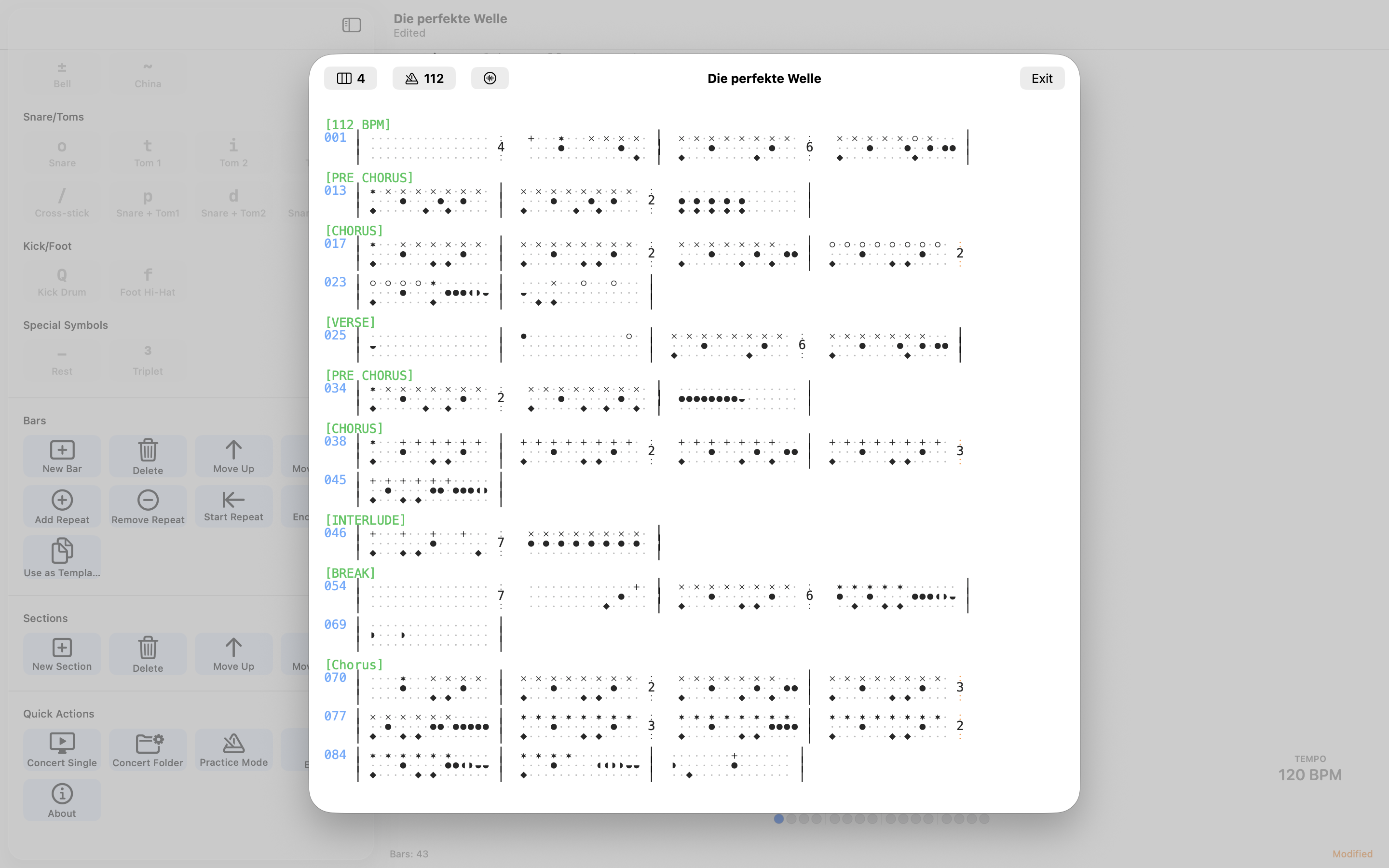
Vollbild-Bühnenansicht mit großem Custom Font (10–40pt). Beat-Grouping-Hintergrund. Playlist-Support mit Ordner-Navigation. Wiedergabe-Steuerung mit Tastaturkürzeln.
Charts mit Songtext und Akkorden. Abschnitts-Überschriften grün, Hinweiszeilen grau, Akkorde blau. Eingebettete Drum-Bars werden automatisch erkannt. Mehrspaltig im Concert Mode.
Drei Symbole für gleichzeitige Snare+Tom-Schläge: p (Snare+Tom1), d (Snare+Tom2), g (Snare+FloorTom). Perfekt für Fills.
Beginne ein Chart auf dem iPhone, bearbeite es auf dem iPad weiter, spiele es auf dem Mac im Concert Mode. Nahtlose iCloud-Synchronisation über alle Gerate.
Jeder Takt hat drei Zeilen. Jede Zeile hat ihre eigenen Symbole.
Vollbild-Bühnenansicht mit Custom Font, Beat-Grouping-Streifen und BPM-Widget. Optimiert für Lesbarkeit aus der Distanz.
Alle wichtigen Funktionen auf einen Tastendruck — auf Mac und iPad mit externer Tastatur.
Erstelle ein neues Dokument (Cmd+N), füge einen Takt ein (Cmd+B) und platziere den Cursor in eine der drei Zeilen. Die Symbol-Palette zeigt dir automatisch nur die Symbole, die an dieser Stelle gültig sind. Tippe x für Hi-Hat, o für Snare, Q für Kick — oder klicke ein Symbol in der Palette.
Drücke die Leertaste, um dein Chart sofort zu hören.
Öffne das Export-Menü und wähle „MusicXML“. Die erzeugte .musicxml-Datei kannst du direkt in MuseScore, Sibelius, Finale oder Dorico öffnen. Alle Notationselemente werden übertragen: Taktarten, Triolen, Wiederholungen, Flams, Ghost Notes, Swing-Markierungen und Abschnitts-Überschriften als Rehearsal Marks.
Über das Export-Menü → „MIDI File“ oder mit Cmd+Shift+M. Die .mid-Datei nutzt das General-MIDI-Drum-Mapping auf Kanal 10. Im Dialog wählst du, ob die Snare/Tom-Stimme (mittlere Zeile) nach oben zu den Becken oder nach unten zu den Füßen notiert wird — und kannst das BPM überschreiben. Swing, Triolen, Flams und Ghost Notes werden mit übertragen.
Platziere das ³-Symbol vor den letzten zwei Noten einer Dreiergruppe. Beispiel: x³xx erzeugt eine Hi-Hat-Triole. Die drei Noten teilen sich den Platz von zwei 16tel-Noten. Triolen funktionieren auf allen drei Zeilen und können mit Swing kombiniert werden.
Ja! Seit Version 2.0 mischt Drum Charter sein Audio mit anderen Apps. Starte deinen Song in Apple Music, Spotify oder jeder anderen App, öffne dein Chart in Drum Charter und drücke Play — beide spielen gleichzeitig.
Ja. Drum Charter nutzt die dokumentbasierte Architektur von iOS und macOS. Speichere deine Charts in iCloud Drive, und sie werden automatisch auf all deinen Geräten synchronisiert. Beginne auf dem iPhone, arbeite auf dem iPad weiter, spiele auf dem Mac.
Nein. Drum Charter nutzt eine einfache Text-Notation: Jeder Takt hat drei Zeilen (Becken, Snare/Toms, Kick/Fuß), und du tippst Zeichen wie x, o und Q auf ein Raster aus 16 Positionen. Die Symbol-Palette zeigt dir an jeder Stelle, was möglich ist. Wer schon mal einen Beat im Kopf hatte, kann ihn hier in Minuten aufschreiben.
Drum Charter unterstützt 4/4 (16 Positionen pro Takt), 3/4 und 6/8 (je 12 Positionen). Setze die Taktart als Direktive an den Anfang, z. B. [3/4], oder nutze den Taktart-Picker. Das Tempo reicht von 60 bis 200 BPM — per [120 BPM] im Header oder jederzeit über den Tempo-Regler.
Schreibe [Shuffle] oder [Swing 67] in den Header. Swing verschiebt die Achtel-Offbeats zeitlich nach hinten und erzeugt das „schwingende“ Gefühl. Werte von 50 % (völlig gerade) über 67 % (klassischer Shuffle) bis 75 % (extrem). Swing wirkt in 4/4 und lässt sich mit Triolen kombinieren.
Ja. Verbinde dein E-Drum-Set per USB oder Bluetooth MIDI und öffne den Practice Mode. Während du im Loop mitspielst, zeigen Cyan-Streifen auf der Notation, wo deine Schläge zeitlich landen — so siehst du sofort, ob du eilst oder schleppst. Ein Latenz-Ausgleich (0–60 ms) gleicht die Verzögerung deines Audio-Interfaces aus. Zusätzlich erkennt die App dein Live-Tempo in Echtzeit.
Ja. Exportiere als PDF (Cmd+Shift+D oder über das Share-Sheet), wahlweise mit dezenten Beat-Grouping-Streifen als Lese-Hilfe. Ideal für den Notenständer oder zum Teilen mit der Band. Wer echte Standardnotation braucht, exportiert nach MusicXML und druckt aus MuseScore, Sibelius oder Dorico.
Prüfe folgende Punkte:
Schreib uns eine E-Mail — wir antworten innerhalb von 24–48 Stunden.
support@drumcharter.quantum-locked.netText-based drum notation with real-time playback. Export to MusicXML and MIDI. Perform on stage with Concert Mode. For iPhone, iPad, and Mac.
MusicXML and MIDI export, Concert Mode playback, multi-column lyrics, native macOS fullscreen, and a new app icon.
Export your drum charts to MusicXML — the universal notation exchange format. Open them directly in MuseScore, Sibelius, Finale, or Dorico. All time signatures, triplets, repeats, flams, ghost notes, swing markings, and rehearsal marks are included.
Export charts as Standard MIDI Files (.mid) with two-voice layout. Cymbals separated from kick/snare/toms for clean DAW import. Configurable stem grouping. Works with Logic Pro, GarageBand, Ableton, and any DAW.
Play, pause, skip forward/back — all from the stage view. On-screen controls in the BPM widget plus keyboard shortcuts (Space, Arrow keys). Editor playback stops automatically when entering Concert Mode.
New [columns: N] directive for multi-column lyrics in Concert Mode. Fit more text on screen during performance. Columns adapt to screen width automatically. N = 1–3, works on iPad and Mac.
Concert Mode enters its own fullscreen Space with auto-hiding menu bar. A truly immersive stage view, just like you'd expect from a professional app.
Play along with Apple Music, Spotify, or any other app. Drum Charter mixes its audio instead of silencing other apps. Perfect for playing along with the original track.
Each bar consists of three lines: cymbals on top, snare and toms in the middle, kick and foot hi-hat on the bottom. Simple symbols you can type directly. The examples below appear in the app's own drum font — use the Drums / ASCII switch at the top right to reveal the plain text underneath.
Four bars with eighth-note hi-hat, snare backbeat on 2 and 4, four-on-the-floor kick. The second bar repeats 4×.
Ride cymbal, brush snare on beat 2, soft kick on 1. Swing feel via the Shuffle directive.
Sixteenth-note hi-hat, loud backbeat on 2 and 4, quiet ghost snares (º) in between. A single bar, repeated four times with (4×).
Calm compound feel with 12 positions per line. Cross-stick (/) instead of loud snare, sparse kick.
For multi-instrumentalists: lyrics and chords instead of notation. Drum bars can be embedded.
Everything you need to write drum charts, practice, and perform live — across all your devices.
The palette shows only symbols valid at your cursor position. Cymbal symbols in line 1, snare/toms in line 2, kick/pedal in line 3. No invalid input possible.
High-quality drum sounds with FluidR3_GM soundfont and 48th-note precision grid. Press Play and hear your chart instantly. Tempo adjustable via slider or BPM metadata.
Two expressive symbols: ö for flam (quick grace note before the main hit) and º for ghost notes (quiet snare). Essential for jazz, funk, and dynamic playing.
Place ³ before two notes: x³xx creates a hi-hat triplet. Works on all three lines. Ideal for shuffle, swing, and fills.
Write [Swing 67] or simply [Shuffle] in your header. Values from 50% (straight) to 75% (extreme). UI button with 5 presets. Authentic jazz/blues feel.
4/4 (standard, 16 positions), 3/4 (waltz, 12 positions), and 6/8 (jig, 12 positions). Time signature picker for quick changes. Beat grouping adapts automatically.
Export charts as PDF with optional beat grouping stripes. Works on iPhone, iPad, and Mac. Perfect for printing, sharing, or archiving.
Visual and audible metronome (wood block). Bar loop for single bars or 2-bar transitions. MIDI hit visualization with cyan stripes. Live BPM detection from e-drums.
Full-screen stage view with large custom font (10–40pt). Beat grouping background. Playlist support with folder navigation. Playback controls with keyboard shortcuts.
Charts with lyrics and chords. Section headers in teal, cue lines in gray, chords in blue. Embedded drum bars auto-detected. Multi-column in Concert Mode.
Three symbols for simultaneous snare+tom hits: p (snare+tom1), d (snare+tom2), g (snare+floor tom). Perfect for fills.
Start a chart on your iPhone, edit it on your iPad, play it on your Mac in Concert Mode. Seamless iCloud synchronization across all devices.
Each bar has three lines. Each line has its own symbols.
Full-screen stage view with custom font, beat grouping stripes, and BPM widget. Optimized for readability at a distance.
All essential functions at a keypress — on Mac and iPad with external keyboard.
Create a new document (Cmd+N), insert a bar (Cmd+B), and place your cursor in one of the three lines. The symbol palette automatically shows only the symbols valid at that position. Type x for hi-hat, o for snare, Q for kick — or click a symbol in the palette.
Press Space to hear your chart instantly.
Open the Export menu and choose “MusicXML.” The generated .musicxml file opens directly in MuseScore, Sibelius, Finale, or Dorico. All notation elements transfer: time signatures, triplets, repeats, flams, ghost notes, swing markings, and section headers as rehearsal marks.
Via Export menu → “MIDI File” or with Cmd+Shift+M. The .mid file uses the General MIDI drum mapping on channel 10. In the dialog you choose whether the snare/tom voice (middle line) is notated up with the cymbals or down with the feet — and you can override the BPM. Swing, triplets, flams, and ghost notes all transfer.
Place the ³ symbol before the last two notes of a group of three. Example: x³xx creates a hi-hat triplet. The three notes share the space of two sixteenth notes. Triplets work on all three lines and combine with swing.
Yes! Since version 2.0, Drum Charter mixes its audio with other apps. Start your song in Apple Music, Spotify, or any other app, open your chart in Drum Charter, and press Play — both play simultaneously.
Yes. Drum Charter uses the document-based architecture of iOS and macOS. Save your charts to iCloud Drive and they sync automatically across all your devices. Start on your iPhone, continue on your iPad, perform on your Mac.
No. Drum Charter uses a simple text notation: each bar has three lines (cymbals, snare/toms, kick/foot), and you type characters like x, o, and Q onto a 16-position grid. The symbol palette shows what's possible at every spot. If you've ever had a beat in your head, you can write it down here in minutes.
Drum Charter supports 4/4 (16 positions per bar), 3/4 and 6/8 (12 positions each). Set the time signature as a directive at the top, e.g. [3/4], or use the time-signature picker. Tempo ranges from 60 to 200 BPM — via [120 BPM] in the header or the tempo slider anytime.
Write [Shuffle] or [Swing 67] in the header. Swing pushes the eighth-note offbeats later in time, creating that loping feel. Values from 50% (perfectly straight) through 67% (classic shuffle) to 75% (extreme). Swing applies in 4/4 and combines with triplets.
Yes. Connect your e-drum kit via USB or Bluetooth MIDI and open Practice Mode. As you play along with the loop, cyan stripes on the notation show where your hits land in time — so you instantly see whether you're rushing or dragging. A latency offset (0–60 ms) compensates your audio interface's delay. The app also detects your live tempo in real time.
Yes. Export as PDF (Cmd+Shift+D or via the share sheet), optionally with subtle beat-grouping stripes as a reading aid. Great for the music stand or sharing with the band. If you need true standard notation, export to MusicXML and print from MuseScore, Sibelius, or Dorico.
Check these points: